Browsed by
Author: jray82

Heat (Grade 7)

Heat (Grade 7)

Find all presentations, videos, screencasts, handouts, and assignments below!

Lesson 1: Introduction to Heat (Heat in the Environment)

Estimating Temperatures Handout 

Lesson 2: Thermometers (3 HW questions located on the last slide)

Lesson 3: Heat, Temperature, and the Particle Theory (HW questions located on the last slide)

Lesson 4: Conduction (3 HW questions located on the last slide)

Lesson 5: Convection

Lesson 6: Radiation

Lesson 7: States of Matter

Lesson 8: Heat Video Worksheet


Fluids (Grade 8)

Fluids (Grade 8)

Our learning, links, and information on Fluids can be found here. All student homework should be saved to your Science: Fluids folder in your Google Drive.

Lesson 1: Introduction to Fluids

7.1 – Introduction to Fluids (read and answer questions # 1-3)

Lesson 2: Laminar and Turbulent Flow

7.2 – Characteristics of Fluids (read and answer questions #1, 3, 5ab, 6)

Laminar vs. Turbulent Flow example

Lesson 3: Viscosity

7.3 – Flow Rate and Viscosity (read and answer questions # 1,2,3, 5)

Calculating Flow Rates Worksheet (Make a copy and answer the 2 questions)

Lesson 4: Density

8.1 – Weight, Mass, and Volume (read and answer questions #2 & 3)

8.3 – Density (read and answer questions # 2 -5)

Lesson 5: Calculating Density

  1. What is Density and How to Calculate Student Note (Read for understanding)
  2. Calculating Density Worksheet #1 (Answer #1 – 3, 5 – 7)
  3. Calculating Density Worksheet # 2 (Answer #1 – 4)
  4. Comparing Densities Enrichment Questions
  5. Comparing Densities: Worksheet Answer questions A, B, and C using the Chart

SOLUTIONS

Worksheet #1 and #2 Solutions 

Density Calculation Quiz

To prepare for your quiz, review and practice 1 – 5 (above from lesson 5).

Lesson 6: Buoyancy and Displacement

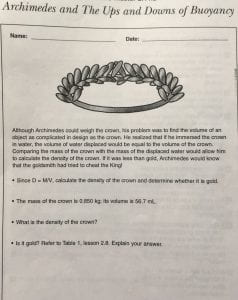
Archimedes and The Ups and Downs of Buoyancy – link

8.5 – Buoyancy (Read to learn more about buoyancy, displacement, density, and how ships carry cargo)

Answer questions #1-4

Lesson 7: Fluids Under Pressure

9.1 – Putting the Squeeze on Fluids (Read and answer questions #1-4)


Lesson 8: Fluids in Real Life

9.5 – Pressure, Volume, and Temperature (Read and answer questions #1 and 4)

9.7 – The Value of Valves (Read and answer questions #1-3)

Lesson 9: Exploring Density Lab

Density Lab link

Test Review

Fluids Unit Test Student Review Sheet

Space (Grade 6)

Space (Grade 6)

This post will contain all of the grade 6 lessons on space. Students will be learning about the components of the solar system, including the Sun, Earth, and other planets, as well as comets, asteroids, and meteoroids. They will learn to connect the force of gravity concepts previously taught in our flight unit to the relationships found between celestial objects in space. Later in this section, students will investigate various technologies that are used in space exploration with a focus on Canada’s contribution to our understanding of space. We will begin by learning about stars, specifically, our most important and closest star.

Lesson 1: Introduction to Our Solar System


The Universe is Massive!

Solar System Simulator Activity (Make a copy for yourself in your Space folder and follow the instructions)

Lesson 2: That Glorious Old Sun

That Glorious Old Sun Research Activity link

  1. Make a copy of the link above and add it to your space folder
  2. Complete the questions
  3. Include a works cited page
  4. Create a slideshow/Canva/visual that displays your answers in a visually appealing design

Lesson 3: Space Design Challenge!

  1. Tinkercad Login Instructions
  2. Spaceship Design Challenge Rubric
  3. Tinkercad Design Reflection

The Grade 6 Shuttle Voting Machine! (Click the link to enter your vote)

Lesson 4: The Earth’s Orbit and Seasons

Lesson 5: Phases of the Moon

  1. Complete this online worksheet on the moon’s phases and take a screenshot of the finished product. Place the screenshot in a Google Doc and answer the next question underneath it.
  2. Where does the term ‘Blood Moon’ come from?

Bonus: Take this Quiz to see how well you know the phases

Lesson 6: Eclipses

Lesson 7: Comets, Asteroids, Meteors, & Meteorites

Student code login details here

Lesson 8: Spring and Neap Tides

Lesson 9: Planets and our Solar System

Lesson 10: Bill Nye Space Exploration

Space Exploration Video Worksheet (Make a copy, submit to your hand-in folder)

Lesson 11: Canadians in Space

Lesson 12: What Causes the Northern Lights

Blog hunt link – Part 1

Blog hunt link – Part 2


Chemistry (Grade 7)

Chemistry (Grade 7)

All of our Pure Substances & Mixtures unit resources will be posted here and broken down into 3 subunits: Classifying matter, Solutions, and Separating Mixtures. We will also be learning about atoms and the periodic table of elements.

Lesson 1: Classifying Matter

1.1 – What is Matter?

  1. Read section 1.1, noting the definitions of Chemistry and Matter
  2. Create a Google Doc, and answer questions #2 and 3 (Save this document to your Chemistry folder)

1.2 – More About Matter (After adding to your Chemistry folder, read and answer questions #1 -4)

  1. Read the section 1.2
  2. Answer questions #1 – 4 (Save this document to your Chemistry folder)

Classifying Matter Quiz Study Sheet

Lesson 2: Pure Substances vs. Mixtures

1.4 – Pure Substances and Mixtures (Read and answer questions #1, 3, and 4)

Try this Homogeneous vs. Heterogeneous Quizizz to see how well you know the material so far

1.6 – Mechanical Mixtures and Solutions (Read and answer questions #1, 2, and 5)


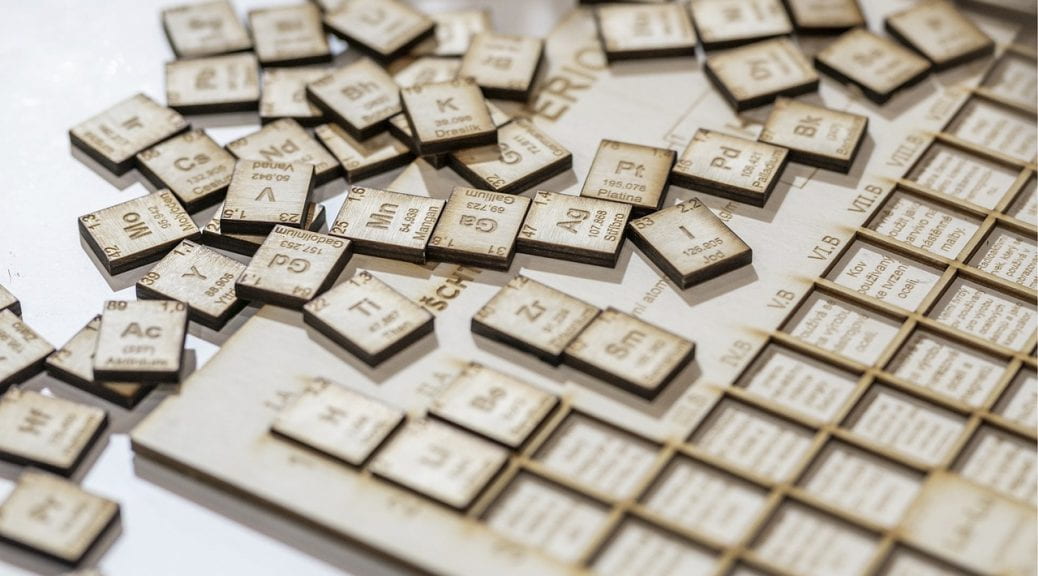
Lesson 4: The Periodic Table of Elements

Some Key Concepts About Elements and Their Atoms

  • Atoms are made of extremely tiny particles called protons, neutrons, and electrons.
  • Protons and neutrons are in the center of the atom, making up the nucleus.
  • Electrons surround the nucleus.
  • Protons have a positive charge.
  • Electrons have a negative charge.
  • The charge on the proton and electron are exactly the same size but opposite.
  • Neutrons have no charge.
  • Since opposite charges attract, protons and electrons attract each other.

How to Read a Box on the Periodic Table of Elements (Google Doc link)


Lesson 5: Building Atoms

  1. Build an Atom Simulator
  2. Build an Atom Simulator student assignment

Lesson 6: Solutions

2.1 – Solutes and Solvents (Read and answer questions #1-6)

Lesson 7: Dissolving Rates and the Particle Theory

2.2 – Dissolving and the Particle Theory

Answer the 3 self-check questions and save them to your Chemistry folder

Lesson 8: Solubility

2.3 – Concentration and Solubility (Read and answer questions #2-6)

Lesson 9: Labs

Lesson 10: Chemical Reactions

Lesson 11: Separating Mixtures

3.2 – Separating Mechanical Mixtures (Answer #1-4)

3.5 – Separating Solutions (Answer #1-3, don’t worry about drawing a picture for question 2)

Lesson 12: How to Draw Bohr Rutherford Diagrams

Could Do

  1. Take this quick quiz on the Particle Theory.
  2. Other States of Matter (Read the following if you are interested in the 4th State of Matter, Plasma)
Innovation Day 2026

Innovation Day 2026

Welcome to the 2026 Innovation Day. A day to celebrate Science here at the OJCS. Find the full schedule breakdown at the bottom of this post and parent visitation times for presentations in the graphic. Innovation Day outlines and rubrics for the middle school projects are also posted below.

Grade 6 Innovation Day – Electricity Project

Grade 7 Innovation Day – Animal Structures Project

Grade 8 Innovation Day – Simple Machines Project

OJCS Innovation Day Schedule

Day 1 (Tuesday, Feb. 10th)

  • 2:25 – 3:00 Set up for grades 6, 7, and 8 (gym)
  • 3:00 – 4:00 Open to parents and K – 5 classes to visit grades 6 to 8 projects (gym)

Day 2 (Wednesday, Feb. 11th)

  • 9:00 – 10:55 Judging in the gym of Grade 6, 7, and 8 Projects (by external judges)
  • 9:00 – 9:45 In-class presentations for K-5 (Open to parents and friends to visit K-5 projects)
  • 10:55 – 11:15 Snack break
  • 11:15 – 11:30 Tefillah for grades 6 to 8 students followed by class as usual
  • 11:05 – 1:05 Grade 6 to 8 projects left up in the gym for K–5 classes to visit
  • 1:45 – 2:25 Clean-up of grades 6 to 8 Projects in gym
  • 3:05 Whole school assembly to announce the grade 6, 7, and 8 bronze, silver, and gold medalists.
Electricity (Grade 6)

Electricity (Grade 6)

This post contains all of the grade 6 lessons on electricity. Students will learn about the short—and long-term impacts of electrical energy technologies in Canada on society and the environment. They will learn how circuits work by building their own series and parallel circuits and assess choices that reduce personal use of electrical energy.

Lesson 1: Series and Parallel Circuits

Lesson 2: Building Circuits

Lesson 3: Fixing Electrical Problems

There are so many uses for electricity. But what happens when something isn’t working right? Maybe your computer speakers are not working or your refrigerator isn’t staying cold. What do people do? They often need to take their appliance in to be repaired or have a technician come to the house to repair the appliance. The technician has to figure out what is wrong and why the device is not working properly. This process is called troubleshooting. Let’s practice some troubleshooting skills to solve electrical problems.

Lesson 4: What is Static Electricity?

Lesson 5: How Do Batteries Work?

Lesson 6: Renewable vs. Non-Renewable Energy

Energy Quiz Study Sheet

Innovation Day – Electricity Project

Project Checklist

The Scientific Method


Structures (Grade 7)

Structures (Grade 7)

7A – Test Section (Feedback)

7B – Test Section (Feedback)

All presentations, links, and videos from the Structures: Form and Function lessons will be posted below.

Lesson 1: Stability and Forces Presentation


Lesson 2: Stress on Structures and Structure Types Presentation

Lesson 3: Stability, Symmetry & Bridge Type Presentation


Innovation Day

Ottawa Regional Science Fair

Students who want to enter an independent project in the ORSF can find all information, links, rubrics, and registration details below.

ORSF (Ottawa Regional Science Fair Info)

Systems in Action (Grade 8)

Systems in Action (Grade 8)

All presentations, links, activities, homework, and videos from the Systems in Action unit will be posted below.

Lesson 1: Simple Machines

2.1 – Simple Machines (Answer questions #2 and 4 in your Simple Machines folder)

Lesson 2: Mechanical Advantage

2.3 – Mechanical Advantage (Read and answer questions #1-4)

Mechanical Advantage Word Problem Practice Sheet

Solutions to Mechanical Advantage Practice Sheet – link

Lesson 3: Work

2.5 – How to Calculate ‘Work’(Read and answer questions #1, 3, 4, & 5)

Lesson 4: Introducing Systems

Student Note

1.1 – Types of Systems (Complete questions #1, 2)

1.2 – System Components (Read and answer questions 2a, and 3)


Simple Machines Quiz Study Sheet

Lesson 5: Simple Machines Video Worksheet

Simple Machines video worksheet

Lesson 6: Designing Efficient Systems

3.1 – Energy on the Loose (Read and answer questions #1-4)

Innovation Day

Ottawa Regional Science Fair

Students who want to enter an independent project in the ORSF can find all information, links, rubrics, and registration details below.

ORSF (Ottawa Regional Science Fair Info) – March 27th & 28th

The Scientific Method

Hanukkia Design Challenge

Hanukkia Design Challenge

Your challenge today will be to design a 3D model of a Hanukkia. Students are challenged to build the candle holder parts of the Hanukkah lamp using the online software program Tinkercad. Each design will creatively incorporate a Jewish hero theme.

Sizing Guidelines

  • Your candle holder should be 10cm (100mm) tall with a diameter of 2.5cm (25mm).

Choose a Theme for your Design

  • Your candle holder design should reflect the theme
  • There are multiple ways that Jewish individuals have impacted our world. Pick one Jew/group of Jews who demonstrated/demonstrates pride in their Jewish identity and has/have made one of the greatest contributions to our universe. Design your candle holder to reflect this person or group of people.

Some possible design ideas!

Which one is your favourite?

Important Info

Tinkercad login instructions link

Flight (Gr. 6)

Flight (Gr. 6)

All presentations, links, activities, homework, and videos from the Flight unit will be posted below.

Lesson 1: Properties of Air 

  1. Watch the video above
  2. Make a copy of the Properties of Air document, add it to your Flight folder, and answer the 6 questions

Lesson 2: Lift vs. Gravity

  1. Make a copy of the Properties of Air Web and add it to your Flight folder notes
  2. Read the following and answer questions #1 and 3

Lesson 3: Adaptations of Flight

  1. Read the following and answer questions #1 and 2 at the end of the document.
  2. All answers should be saved to your Flight folder

Lesson 4: The Four Forces of Flight

  1. Read The Four Forces link (Remember that we use Weight and Gravity interchangeably)
  2. The Four Forces student questions assignment (Make a copy, add to your Flight folder, and complete the assignment)
  3. If finished, play around with this flight simulator to further your understanding of the four forces of flight (must have flash enabled)
  4. Complete this Quizlet on flight when you are finished.

Lesson 5: Air in Motion – Part 1

  1. Read and follow the procedures below.
  2. Answer questions 1 and 2 at the end under the communicate section.

Lesson 5: Air in Motion – Part 2

  1. Read and follow the procedures below.
  2. Answer questions 1 and 3 at the end under the communicate section.

Lesson 6: Take Off

Paper Airplane Airport Challenge Questions

Lesson 7: Video Worksheet

  1. Watch the video above
  2. Make a copy of the Flight video worksheet, add it to your Flight folder, and fill in the answers

Lesson 8: Build Your Own Rocket

  1. Rocket Design Template
  2. 60-second Video Analysis on Canva

End of Unit Review (Make a copy and add it to your Flight folder)

Solutions to the review (Check your answers with these ones and make any necessary adjustments)

Create a Plan to Study – link


Extras

Choose a Wow in World podcast to listen to

Practice your coding skills using these fun challenges from code.org

Skip to toolbar